Changing Windows Computer/Network/VPN Password
Windows Credentials
Currently, passwords are set to expire every six months.
For most people, computer passwords are different than their email passwords.
Notifications:
You will start receiving notifications 3 weeks before your password expires.
You will see a pop-up notification every time you log into your computer.
Example:
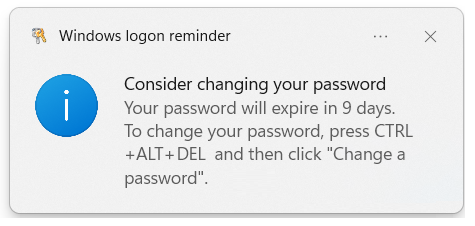
To change your password:
Press CTRL + ALT + DEL on your keyboard.
Click on "Change a password".
Follow the prompts to set your new password.
Here are the password requirements:
Passwords must be 12 characters long and use the following complexity:
1.
Passwords must not contain your name or your
username.
2.
Cannot contain common words like password, apple, bronco, etc.
3.
Cannot contain repeating or successive characters more than two
digits; meaning you cannot use 123 or 333 or abc or aaa.
4.
The password contains characters from three of the following
categories:
·
Uppercase letters.
·
Lowercase letters.
·
Numerals (0 through 9).
·
Non-alphanumeric characters (special characters):
'-!"#$%&()*,./:;?@[]^_`{|}~+<=>.
5.
Tips for creating strong passwords:
·
DO NOT use a password that is the same or similar to one you use
on any other website or account.
·
Make your password hard to guess but easy for you to remember.
·
You can use SPACES in passwords, but not leading at the beginning
or at the end.
·
Create a passphrase instead of a password and make it relevant
to the account.
Examples:
“Meth0d S+udio !s my $ec0nd Hom3”
or
“3n$cape_4_The_W!n”.
“Meth0d S+udio !s my $ec0nd Hom3”
or
“3n$cape_4_The_W!n”.
Remote:
If you change your password while remote, it will not reflect on the server or in-office desktop computer until you have connected to the VPN. Your VPN password is the same as your computer password. You will likely need to connect to the VPN with the old password, then, after being connected for about 15 minutes, you should receive a notification that Windows needs your current credentials.
You can force this process by connecting to the VPN, clicking Start, typing CMD, and launching a Command Prompt.
In the DOS window type:
gpupdate /force
Then press Enter.
In the DOS window type:
gpupdate /force
Then press Enter.
This will take about 5 minutes, but it will indicate that the computer policy has been updated.
Related Articles
VPN: Troubleshooting Barracuda VPN Client
VPN: Troubleshooting Barracuda VPN Client Here are some troubleshooting steps to take if the VPN isn't connecting. Credentials: Your username should be your first initial last name. The password will be your computer password (not email). Your ...VPN: Installing & Setting up Barracuda for remote connection (Windows & MacOS)
VPN: Installing & Setting up Barracuda for remote connection (Windows & MacOS) Installing the Barracuda VPN Network Access Client On the computer you will be using to remote into the office, download and install the Barracuda Network Access Client. ...VPN: Understanding Virtual Private Networks (VPN)
VPN: Understanding Virtual Private Networks (VPN) VPN or Virtual Private Network - What is it? What does it do? Understanding Virtual Private Networks is key to safeguarding your information. VPN stands for Virtual Private Network. It's a service ...Windows: Windows Key🪟 Shortcuts
Windows: Windows Key? Shortcuts The "Windows key," when used with other keys, enables you to execute numerous handy tasks such as launching Settings, File Explorer, the Run command, and apps pinned to the Taskbar, as well as open specific features ...Networking: Map Network Drives
Networking: Map Network Drives If you have issues adding the P: drive or any drive to your computer, follow this guide. Drives are mapped automatically by Group Policy; when you log into your computer, the drives should automatically map. How to ...